Featured Release
qashqade 26.0.0
Sharper insight, enhanced usability. From a new, configurable reporting to risk-free scenario testing. From a more transparent calculation to clearer governance. qashqade 26.0.0 gives you sharper insight and enhanced usability at every step of allocation management.
Clicking play connects to Vimeo and transfers data. Privacy Policy
Sharper Insight, enhanced Usability, every Step of the Way
qashqade 26.0.0 takes the platform another significant step forward. Building on the allocation intelligence introduced in previous releases, this version turns waterfall results into reports your teams can configure themselves more easily. Additionally, it gives admins a safe way to test scenarios before committing to them. Ultimately, this makes the calculations more transparent underneath it all, and sharpens visibility and governance across vehicles, partners and events.
Reporting: From Waterfall Results to Tailored Reports
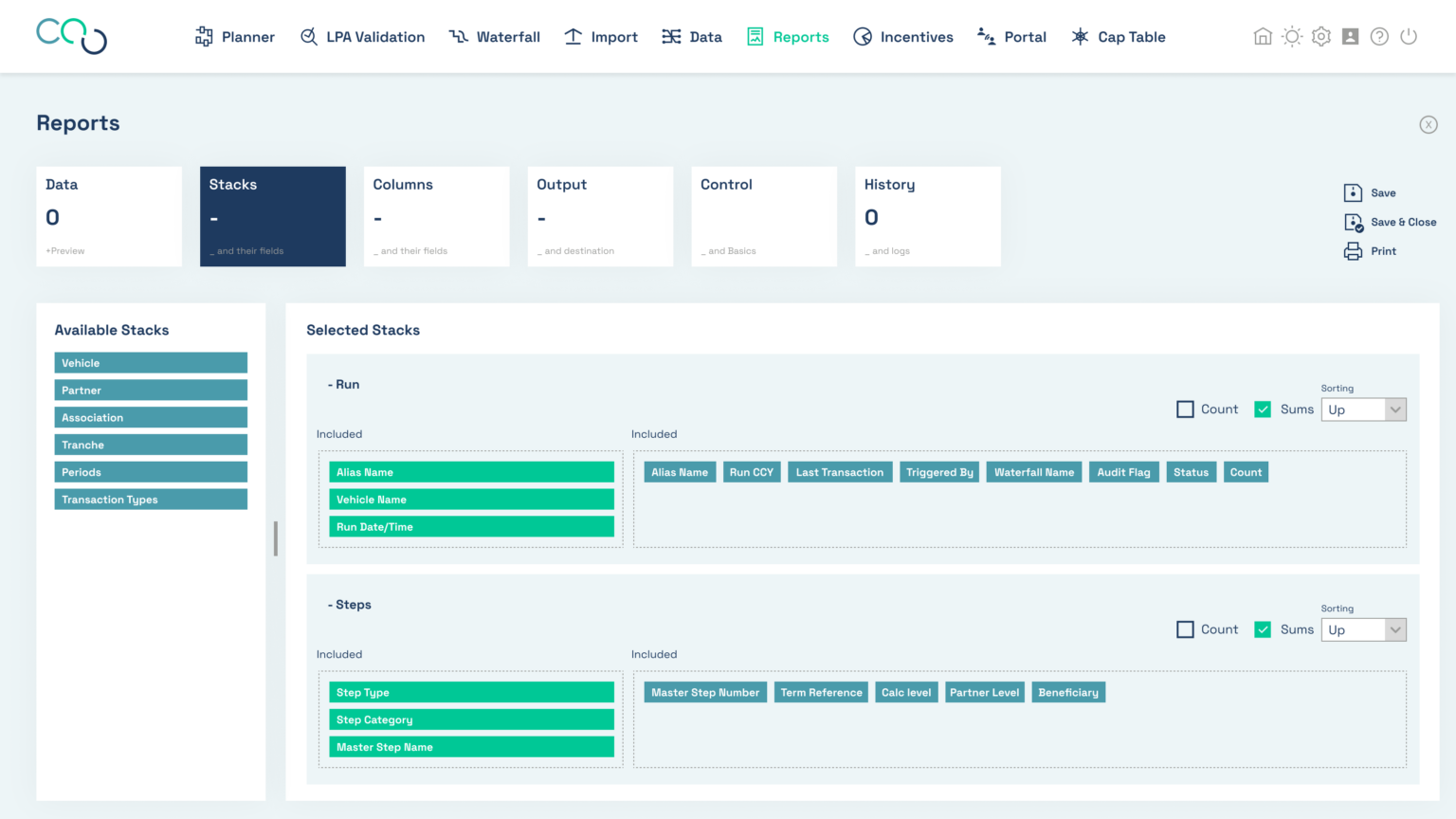
This release introduces the new Reporting module. It lets admins build fully configurable reports directly on top of waterfall calculation results and publish them as Excel or CSV. A report is defined once and can then be run against any waterfall result. So the same layout is reused across vehicles, runs, and points in time. No more rebuilding the same report by hand for every client, every period.
Every report is assembled from a set of simple building blocks:
- Overview: see, open, copy and delete every report you (the admin) have access to.
- Data: select which vehicles and calculations to use in the report.
- Stacks: decide how data is grouped into rows, for example by Association, Step or Vehicle, with the option to show a count of the entities behind each line.
- Columns: choose exactly which values populate the report.
- Filter: restrict the report to specific data, including filtering by period.
- Output: control how the report is presented; Excel or CSV, currency and FX handling, totals, orientation, rounding and number format.
- Control: attach additional context to the report.
- History: every change to the report is tracked automatically.
Preview before you publish. Before a report is produced, admins can preview it directly in the application in a spreadsheet-style view. Layout, groupings and values can be checked before anything is generated and shared.
Two report types for two questions. Alongside the standard report, a new Progress Report shows how figures have changed from one date to the next. This is perfect for tracking how a fund has developed over time. Reports can also be configured to compare specific data sets automatically, for example the daily increment of a value.
Reportable voting and ownership. Reporting distinguishes two types of indices: Firstly, Calculated Indices, values theoretically available on every dimension (such as vested carry points or prices). Secondly, Dimensionless Indices, values that don’t depend on a dimension at all (such as: FX rates). A new Voting & Ownership index is now available under Calculated Indices, making voting and ownership information directly reportable for the first time.
Simulate before you Commit
Reporting isn’t the only new capability in 26.0.0. A new simulation function lets admins define a scenario on a dedicated screen and use it when triggering a run. Because a scenario only produces transactions once it’s actually used in a run, teams can explore “what if” questions freely without ever touching the underlying data. Scenario runs are clearly labelled as such throughout the entity screens and portal. Meaning, there’s never any doubt about what’s live and what’s exploratory.
A Calculation Engine Built for Scale
Underneath the new modules, the calculation engine itself has been substantially strengthened:
- A new BATCH option on the run screen lets admins trigger every run that follows a given run within a structure in one go, instead of triggering each one manually.
- Period restrictions can now be defined against a partner, association or vehicle-level date for example, paying carry only after a partner has left the company.
- The transaction type (TTT) is enforced as the lowest level of information, with exactly one transaction type line and account per transaction within a vehicle, validated on load.
- New Data preparation which can now update the price and/or the number of shares.
- Waterfall Run configuration settings, is now documented in the metadata sheet alongside the results it produced.
- A partner transfer date can be updated to the run date automatically.
Sharper Visibility Across Vehicles and Partners
This release also gives admins and partners a clearer view of who owns and controls what:
- Voting and Ownership rights are now shown per partner, within each vehicle of assignment. This includes an indirect “look-through” calculation showing how much a partner owns or votes further down the structure.
- Partner Value is now split into Realized Value and Unrealized Value, so it’s immediately clear what has already reached the partner versus what’s still expected.
- The Vehicle Value Configuration has been extended so admins can steer defaults centrally, including value source and allocation rule, instead of configuring every vehicle by hand.
- A vehicle now carries information about which partners represent it, so how it’s embedded into a structure is visible without searching for it.
Stronger Event Governance
Event handling has been generalized and tightened up:
- Incentive Events can now cover Shareholders as well as Carry Holders, so shares can be assigned, vested and forfeited just like points.
- The person who creates an event can no longer give the final Second Set of Eyes (SSoE) approval on it, closing the loop on self-approval (this is optional and can be switched off).
- Admins can configure default values so first level approval is granted automatically to valid saved events, shortening the cycle wherever a second step isn’t needed.
- Event loads can now overwrite existing entries, with control over whether SSoE-approved events may be overwritten.
- The order of events is now validated per vehicle rather than at system level.
Everyday Usability, Refined
26.0.0 also carries a long list of smaller improvements that add up:
- The paydown section of the Step Creator has been reworked, making it easier to steer, exclude or adjust proceeds.
- qashqade users can now unblock a run held by another user, or copy a run while it’s blocked; support cases no longer require the client to release the run first.
- Users can access a new navigation pane with the key configuration components by locking waterfall runs for editing.
- Deleting a waterfall run or report now asks for confirmation, preventing accidental deletion.
- Dates can be displayed in European (DD/MM) or American (MM/DD) format.
- Several labels have been clarified for example “Fund level” is now “Vehicle level,” and “Beneficiaries without Interest” is now “GP”.
Performance and Security
- Reporting and UI performance improvements across the platform.
- Keycloak and Apisix updated following penetration-test findings.
- Vulnerability updates applied from OWASP scanning.
- The Receiver application is now compatible with PostgreSQL 17, with the PostgreSQL JDBC driver updated ahead of PostgreSQL 13 reaching end of support.
The Way Forward in Allocation Management
qashqade 26.0.0 helps your teams turn results into insight, test decisions before committing to them, and manage complexity with clarity, precision and confidence. rom the waterfall calculation all the way to the report on someone’s desk.
We have gone live with qashqade 26.1.0 in November. Release 26.1.0 centres around several usability features and improvements to the screens: a new re-con feature, new event type “Proceeds”, improved Workbook builder for reporting and index-based metrics in the calculation engine. You can find out more here.
Stop worrying about whether your numbers are right
You don’t need more flexibility. You need calculations you can trust, explain, and defend. Every single time.